
CBSE Class 10 Information Technology (IT-402) | Unit 3: Relational Database Management Systems (Basic)
Are you looking for easy-to-understand Introduction to DBMS Class 10 notes? In this chapter, you will learn about databases, database management systems, data models, relational databases, primary keys, foreign keys, and the different objects of a database.
These notes explain the important concepts with simple examples, tables, and revision points to help you understand the chapter and prepare for your examinations.
Chapter: Introduction to DBMS
Class: 10
Subject: Information Technology (IT-402)
Unit: Relational Database Management Systems (Basic)
Study Resource: Chapter-wise notes and revision guide
Table of Contents
- Introduction to DBMS
- Data and Information
- Database and DBMS
- Advantages of a Database
- Data Models and Their Types
- Relational Database Terminology
- Primary Key and Foreign Key
- Objects of an RDBMS
- Quick Revision Notes
- Important Terms to Remember
- Frequently Asked Questions
1. Introduction to DBMS
In our daily lives, we deal with a large amount of information. Schools maintain students’ records, hospitals maintain patients’ details, banks maintain account information, and businesses store information about their customers and products.
Managing all this information manually can be difficult. A computerised database helps us store, organise, update, and retrieve information efficiently.
What is a database?
A database is an organised collection of logically related data stored in a structured manner so that it can be accessed, managed, and updated easily.
Example: A school database may contain:
- Students’ names and roll numbers
- Admission numbers
- Class and section details
- Attendance records
- Examination marks
- Contact information
Instead of searching through hundreds of paper files, authorised school staff can retrieve the required information from a computerised database.
2. Data and Information
Data and information are closely related, but they are not the same.
What is data?
Data refers to raw facts and figures that have not necessarily been processed into meaningful information.
Examples of data include:
- Student marks: 78, 85, 92
- Student names: Rahul, Priya, Amit
- Product prices: ₹100, ₹250, ₹500
- Temperatures recorded during a day
What is information?
Information is data that has been processed, organised, or interpreted to make it meaningful and useful.
For example, individual marks are data. A report showing a student’s total marks, percentage, and result is information.
Difference between data and information
| Data | Information |
|---|---|
| Consists of raw facts and figures. | Consists of processed or organised data. |
| May not be meaningful on its own. | Provides meaningful details. |
| Used as an input for processing. | Often obtained as the output of processing. |
| Example: 75, 80, 85. | Example: Average marks = 80. |
Remember: Incorrect data may produce incorrect information. Therefore, data accuracy is important.
3. Database and DBMS
What is a Database Management System?
A Database Management System (DBMS) is software used to create, store, organise, retrieve, and modify data in a database.
It provides a convenient way to manage information without having to handle every record manually.
Examples of database software
Some commonly known database management systems are:
- MySQL
- Oracle Database
- Microsoft Access
- LibreOffice Base
- PostgreSQL
How does a DBMS work?
A DBMS allows users to perform operations such as:
- Create: Create a database or table.
- Insert: Add new records.
- Retrieve: Find and display required information.
- Update: Modify existing records.
- Delete: Remove records when appropriate.
- Manage access: Restrict access to authorised users.
Example: When a school admits a new student, the student’s details can be entered into the school database. If the student’s address changes, the record can be updated without rewriting the entire register.
4. Advantages of a Database
A well-designed database offers several benefits.
4.1 Organised storage
Data is stored systematically, making it easier to locate and retrieve the required records.
Example: A teacher can find a student’s admission details without searching through multiple registers.
4.2 Data analysis
Database information can be used to prepare summaries and analyse records according to specified conditions.
Example: A school can identify students who scored more than 80% in an examination.
4.3 Reduced data redundancy
Data redundancy means unnecessary duplication of the same data.
A properly designed database can reduce repeated storage of identical information.
Example: A student’s personal details can be maintained in one student table and linked to other tables instead of repeatedly storing the same details everywhere.
4.4 Sharing of data
A database can allow multiple authorised users to access relevant information according to their permissions.
Example: Teachers may access marks, while the accounts department accesses fee records.
4.5 Data integrity
Data integrity means maintaining the accuracy and consistency of data.
Rules and constraints can help prevent invalid entries and maintain reliable records.
Example: A student admission number should not be assigned to two different students if it is defined as unique.
4.6 Data security
Database security protects information from unauthorised access, modification, or deletion.
Example: A username, password, and appropriate access permissions can restrict access to confidential student records.
4.7 Privacy
Privacy involves ensuring that personal or confidential information is accessible only to people who are permitted to view it.
Example: A student’s personal contact details should not be freely available to every database user.
4.8 Backup and recovery
A database system may provide tools for creating backups and recovering data after accidental deletion, hardware failure, or other problems.
Example: A school can restore records from a suitable backup if its computer fails.
Exam tip: Learn all eight advantages with a short explanation and one example for each.
5. Data Models
A data model describes how data is organised, stored, and related within a database.
It defines the structure of the data and the relationships between different data items.
The three important data models covered in this chapter are:
- Hierarchical data model
- Network data model
- Relational data model
5.1 Hierarchical Data Model
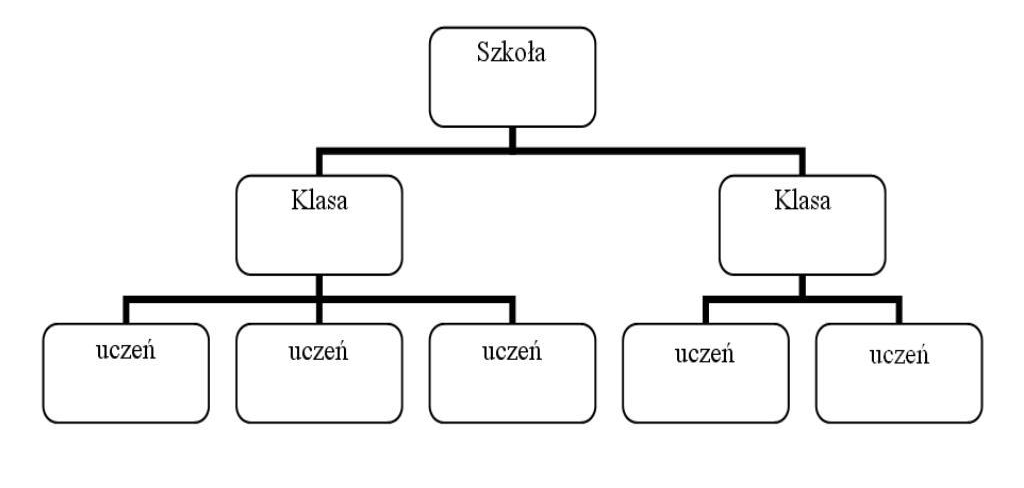
In the hierarchical data model, data is organised in a tree-like structure.
A parent record can have multiple child records, forming different levels of a hierarchy.
Example:
A school may organise information like this:
- School
- Class IX
- Section A
- Section B
- Class X
- Section A
- Section B
- Class IX
This is a simplified illustration of a hierarchy, not a complete database design.
Key point: The hierarchical data model represents data through parent-child relationships.
5.2 Network Data Model
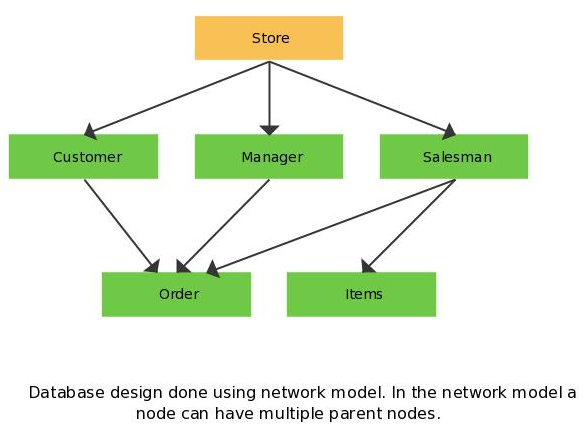
The network data model represents data using interconnected records. It can represent more complex relationships, including many-to-many relationships.
Example: A student can enrol in several activities, and each activity can have several students.
This relationship can be represented through interconnected records.
Key point: The network data model allows records to be connected through multiple paths.
5.3 Relational Data Model
The relational data model organises data into tables consisting of rows and columns.
Different tables can be linked using common fields or related key fields.
It is one of the most widely used approaches to database organisation.
The relational model was proposed by E. F. Codd in 1970.
Example: A school database may contain separate tables for students, subjects, and examination marks. These tables can be connected using appropriate identifiers.
Difference between the three data models
| Hierarchical | Network | Relational |
|---|---|---|
| Organises data like a tree. | Organises data as interconnected records. | Organises data into tables. |
| Represents parent-child relationships. | Supports multiple interconnected relationships. | Uses common fields and keys to connect tables. |
| Suitable for hierarchical structures. | Suitable for complex interconnected relationships. | Suitable for structured tabular data. |
6. Relational Database Terminology
Understanding the terminology of a relational database is essential for this chapter.
6.1 Entity
An entity is a real-world person, place, object, or concept about which information is stored.
Examples include:
- Student
- Teacher
- Book
- Employee
- Product
For a Student entity, attributes may include Admission Number, Name, Class, and Date of Birth.
6.2 Attribute or Field
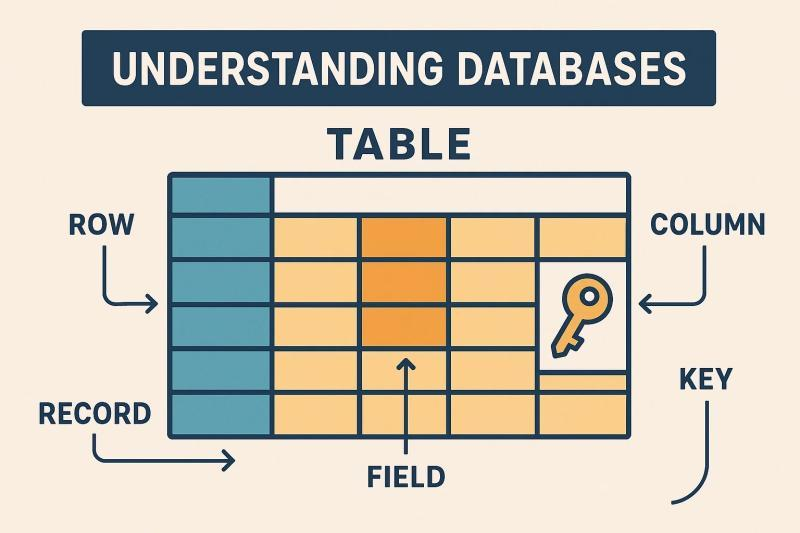
An attribute describes a characteristic of an entity. In a relational table, attributes are represented by columns, also commonly called fields.
For example, a Student table may contain the fields Admission_No, Student_Name, Class, and Section.
6.3 Table
A table is a collection of related data arranged in rows and columns.
Example:
| Admission_No | Student_Name | Class |
|---|---|---|
| 101 | Aarav | X |
| 102 | Diya | X |
| 103 | Rohan | X |
This table stores information about three students.
6.4 Record, Row, or Tuple
A record is a complete set of related field values for one entry in a table. In a relational table, a record is represented by a row.
For example, 101 | Aarav | X is one record in the Student table.
6.5 Data Values
Data values are the actual values stored in fields.
Examples include:
101AaravXA
Important relationship to remember
Fields form a record. Records form a table. Related tables form a relational database.
7. Primary Key and Foreign Key
Keys are important because they help identify records and establish relationships between tables.
7.1 Primary Key
A primary key is a field, or combination of fields, that uniquely identifies each record in a table.
A primary key must contain unique values and cannot contain NULL values.
Example:
| Admission_No | Student_Name |
|---|---|
| 101 | Aarav |
| 102 | Diya |
| 103 | Rohan |
Here, Admission_No can be the primary key because each student has a different admission number.
Functions of a primary key:
- Uniquely identifies each record.
- Prevents duplicate key values.
- Helps establish relationships between tables.
7.2 Foreign Key
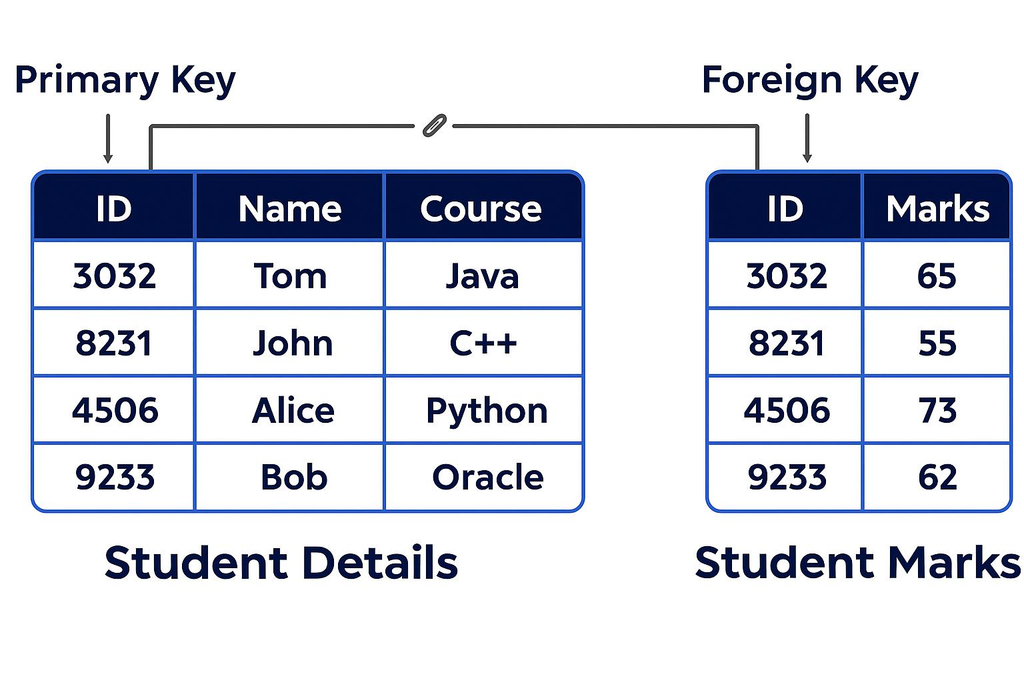
A foreign key is a field, or combination of fields, in one table that refers to a candidate key—commonly the primary key—of another table.
It helps establish relationships between related tables.
Consider these two tables.
Student Table
| Admission_No (Primary Key) | Student_Name |
|---|---|
| 101 | Aarav |
| 102 | Diya |
| 103 | Rohan |
Marks Table
| Mark_ID (Primary Key) | Admission_No (Foreign Key) | Marks |
|---|---|---|
| 1 | 101 | 85 |
| 2 | 102 | 91 |
| 3 | 103 | 78 |
The Admission_No field in the Marks table refers to Admission_No in the Student table.
This relationship allows the database to associate each marks record with the correct student.
Difference between primary key and foreign key
| Primary Key | Foreign Key |
|---|---|
| Uniquely identifies records in its table. | Establishes a relationship with a referenced table. |
| Must be unique and cannot be NULL. | May contain repeated values and may be NULL where permitted by the database design. |
| A table has one primary-key constraint, which can involve multiple columns. | A table can have multiple foreign-key constraints. |
| Example: Admission_No in Student. | Example: Admission_No in Marks. |
7.3 Composite Primary Key
A composite primary key consists of two or more fields used together to uniquely identify a record.
Example:
| Student_ID | Subject_ID | Marks |
|---|---|---|
| 101 | IT | 85 |
| 101 | ENG | 90 |
| 102 | IT | 78 |
If each student can have only one marks record per subject, the combination of Student_ID and Subject_ID can form a composite primary key.
Neither field needs to be unique by itself; their combination must be unique.
7.4 Candidate Key and Alternate Key
A candidate key is a minimal field or combination of fields that can uniquely identify every record in a table.
The candidate key selected to identify records is the primary key. Other candidate keys not selected as the primary key are called alternate keys.
Example: If both Admission_No and a properly maintained unique Registration_No can identify every student, both may be candidate keys. If Admission_No is chosen as the primary key, Registration_No can be an alternate key.
8. Objects of an RDBMS
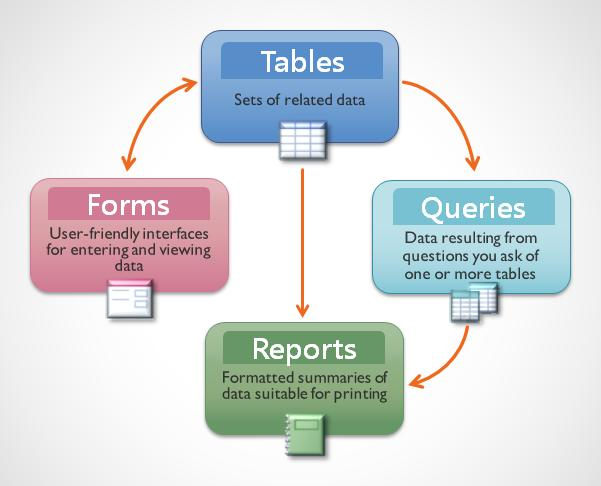
A relational database management system commonly uses tables, forms, queries, and reports to store, enter, retrieve, and present data.
8.1 Tables
A table is the basic structure used to store data in rows and columns.
Example: A Student table stores admission numbers, names, and classes.
8.2 Forms
A form provides a user-friendly interface for entering, viewing, or editing data in a database.
Example: A student registration form allows the operator to enter a student’s name, admission number, and class into the database.
8.3 Queries
A query is a request to retrieve or manipulate data according to specified conditions.
Example: A query can retrieve the names of students whose marks are greater than 80.
8.4 Reports
A report presents selected database information in a formatted and organised manner.
Example: A school examination report may display students’ names, marks, totals, and results.
Difference between tables, forms, queries, and reports
| Object | Main purpose | Example |
|---|---|---|
| Table | Stores data. | Student records |
| Form | Provides an interface for data entry and viewing. | Admission form |
| Query | Retrieves or processes selected data. | Students scoring above 80 |
| Report | Presents formatted information. | Examination result report |
9. Quick Revision Notes
Revise these important points before your examination:
- A database is an organised collection of related data.
- Data consists of raw facts and figures.
- Information is processed or organised data.
- DBMS stands for Database Management System.
- A DBMS helps create, retrieve, update, and manage database information.
- Data redundancy means unnecessary duplication of data.
- Data integrity refers to the accuracy and consistency of data.
- A data model describes how data is organised and related.
- The hierarchical model organises records in a tree-like structure.
- The network model connects records through multiple relationships.
- The relational model organises data into tables.
- A field or attribute is represented by a column.
- A record or tuple is represented by a row.
- A primary key uniquely identifies records.
- A foreign key establishes relationships between tables.
- A composite primary key uses two or more fields together.
- A form provides a convenient interface for entering data.
- A query retrieves or manipulates selected data.
- A report presents information in a formatted layout.
- Related tables together form a relational database.
10. Important Terms to Remember
| Term | Meaning |
|---|---|
| Database | Organised collection of related data |
| DBMS | Database Management System |
| Data | Raw facts and figures |
| Information | Processed or organised data |
| Data redundancy | Unnecessary duplication of data |
| Data integrity | Accuracy and consistency of data |
| Entity | Real-world object about which data is stored |
| Attribute | Characteristic of an entity |
| Field | Column in a relational table |
| Record | Row in a relational table |
| Primary key | Key that uniquely identifies a record |
| Foreign key | Key field that refers to a key in another table |
| Composite primary key | Primary key made up of multiple fields |
| Form | Interface for entering and viewing data |
| Query | Request to retrieve or manipulate data |
| Report | Formatted presentation of selected data |
11. Frequently Asked Questions
Q1. What is DBMS?
A DBMS is software used to create, organise, store, retrieve, and modify data in a database.
Q2. What is the difference between data and information?
Data consists of raw facts and figures, whereas information is data that has been processed or organised to make it meaningful.
Q3. State any four advantages of a database.
Four advantages are organised storage, reduced data redundancy, data sharing, and improved data security.
Q4. What is a data model?
A data model describes how data is structured, stored, and related within a database.
Q5. Name the three types of data models discussed in this chapter.
They are the hierarchical data model, network data model, and relational data model.
Q6. What is a primary key?
A primary key is a field or combination of fields that uniquely identifies each record in a table.
Q7. What is a foreign key?
A foreign key is a field or combination of fields that refers to a key in another table and helps establish a relationship between tables.
Q8. What is a composite primary key?
A composite primary key consists of two or more fields that jointly identify a record uniquely.
Q9. What is the purpose of a query?
A query is used to retrieve or manipulate selected data according to specified conditions.
Q10. Differentiate between a form and a report.
A form provides an interface for entering and viewing data, whereas a report presents selected information in a formatted layout.
Conclusion
The chapter Introduction to DBMS introduces the fundamental concepts of database management. Understanding data and information, database advantages, data models, relational terminology, keys, and database objects will help you build a strong foundation for further learning in Information Technology.
Read these notes carefully, practise drawing the three data models, and revise the differences between primary keys, foreign keys, forms, queries, and reports.
Keep learning with The Study Smart!