Introduction
A stack is one of the most important linear data structures in Computer Science. It is widely used in programming, memory management, expression evaluation, browser history and many other applications.
In this chapter, we will understand the concept of Stack, its working principle, basic operations, implementation using Python lists, and its application in converting and evaluating arithmetic expressions.
These CBSE Class 12 Computer Science Chapter 3 notes are designed to help students understand the concepts easily and prepare for their board examinations.
1. Introduction to Data Structures
A data structure is a particular way of organising, storing and managing data so that it can be accessed and processed efficiently.
Data structures help programmers organise large amounts of information and perform operations such as insertion, deletion, searching and sorting.
Examples of Data Structures
- Array
- Linked List
- Stack
- Queue
- Tree
- Graph
- String
- List
- Tuple
- Set
Types of Data Structures
Data structures are broadly classified into two categories:
1. Linear Data Structure
A data structure in which elements are arranged sequentially, one after another, is called a linear data structure.
Examples:
- Array
- Stack
- Queue
- Linked List
2. Non-Linear Data Structure
A data structure in which elements are not arranged sequentially is called a non-linear data structure.
Examples:
- Tree
- Graph
2. What is a Stack?
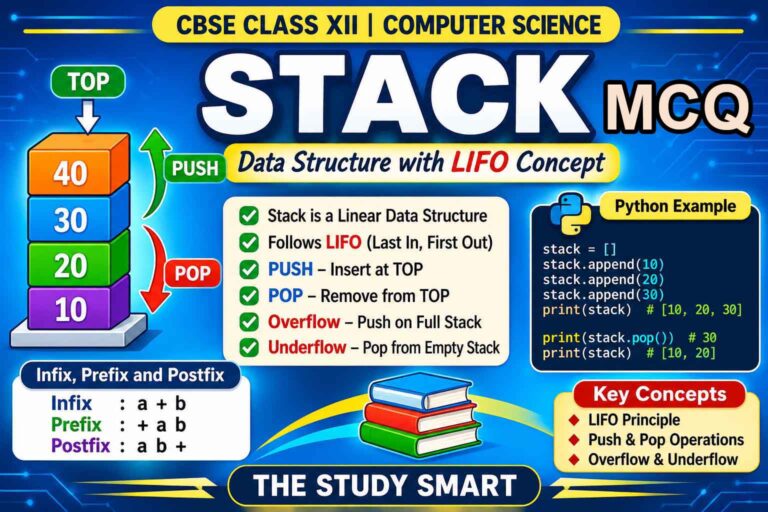
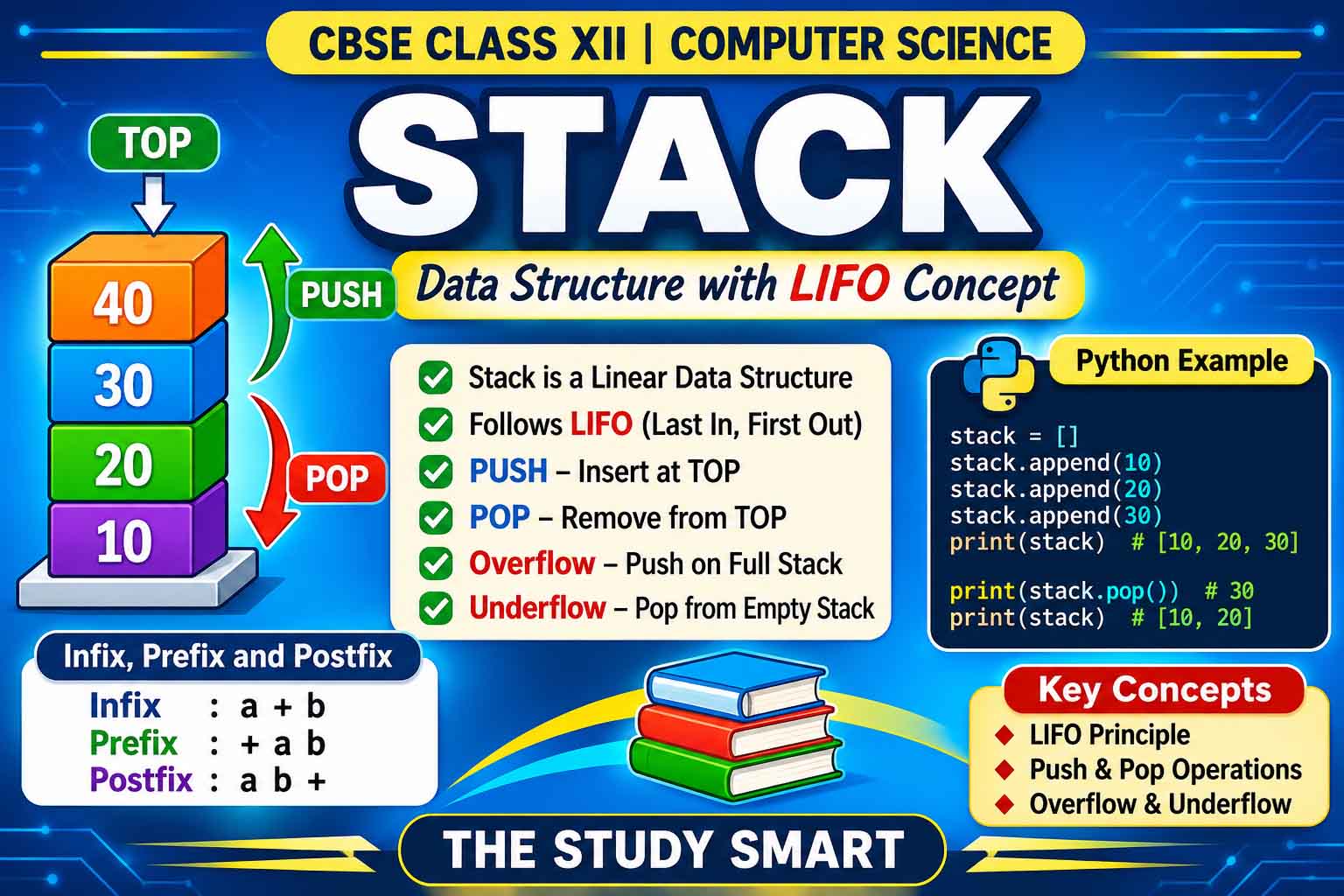
A Stack is a linear data structure in which insertion and deletion of elements take place only at one end, called the TOP.
It follows the LIFO (Last In, First Out) principle.
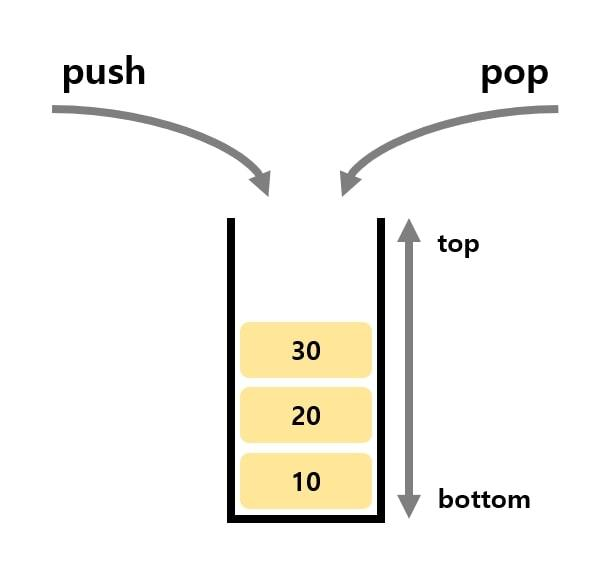
This means the element inserted last will be removed first.
Real-Life Examples of Stack
- A pile of plates in a kitchen.
- A pile of books.
- A pile of clothes in a cupboard.
- A stack of boxes.
- Bangles worn on a wrist.
Understanding LIFO
Suppose we insert three elements into an empty stack:
- PUSH 10
- PUSH 20
- PUSH 30
The stack will look like this:
TOP → 30
20
10
When we remove an element using POP, 30 will be removed first because it was inserted last.
Therefore:
Insertion Order: 10, 20, 30
Deletion Order: 30, 20, 10
This is known as Last In, First Out (LIFO).
3. Applications of Stack
Stacks are used in many real-world applications and computer programming operations.
Important applications include:
- Browser History: The Back button uses a stack-like mechanism to return to previously visited pages.
- Undo and Redo: Text editors and image editors use stacks to maintain editing history.
- Function Calls: Programming languages use a call stack to manage function execution.
- String Reversal: A stack can reverse a string by removing characters in reverse order.
- Parentheses Matching: Compilers use stacks to check matching brackets in expressions.
- Expression Evaluation: Stacks are used to convert and evaluate arithmetic expressions.
- Memory Management: Stack memory is used for function calls and local variables.
4. Operations on Stack
The two fundamental operations performed on a stack are:
A. PUSH Operation
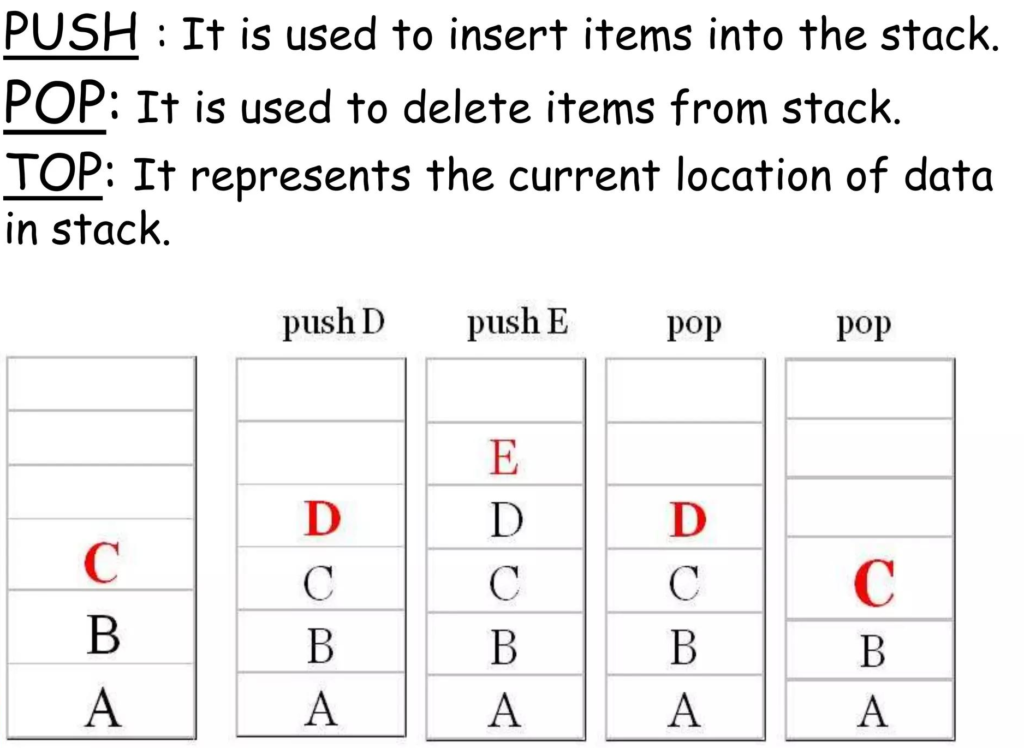
PUSH is an insertion operation used to add a new element at the TOP of the stack.
Example:
Initially, Stack = [ ]
After PUSH(10): [10]
After PUSH(20): [10, 20]
After PUSH(30): [10, 20, 30]
TOP = 30
B. POP Operation
POP is a deletion operation used to remove the topmost element from the stack.
Example:
Initially, Stack = [10, 20, 30]
After POP(): [10, 20]
Removed element = 30
TOP = 20
Other Important Stack Operations
| Operation | Description |
|---|---|
| PUSH | Inserts an element at the top |
| POP | Removes the topmost element |
| PEEK / TOP | Returns the topmost element without removing it |
| isEmpty() | Checks whether the stack is empty |
| size() | Returns the number of elements |
| display() | Displays all stack elements |
Stack Overflow
Stack Overflow occurs when we try to insert an element into a stack that is already full.
Example: If the maximum capacity of a stack is 5 and it already contains 5 elements, attempting another PUSH operation results in overflow.
Stack Underflow
Stack Underflow occurs when we try to remove an element from an empty stack.
Example: If a stack contains no elements and we perform POP(), an underflow condition occurs.
Important for examinations:
- PUSH on a full stack = OVERFLOW.
- POP on an empty stack = UNDERFLOW.
5. Implementation of Stack Using Python
Python does not have a separate built-in Stack data type. However, we can implement a stack using the built-in List data type.
Two important Python list methods are used:
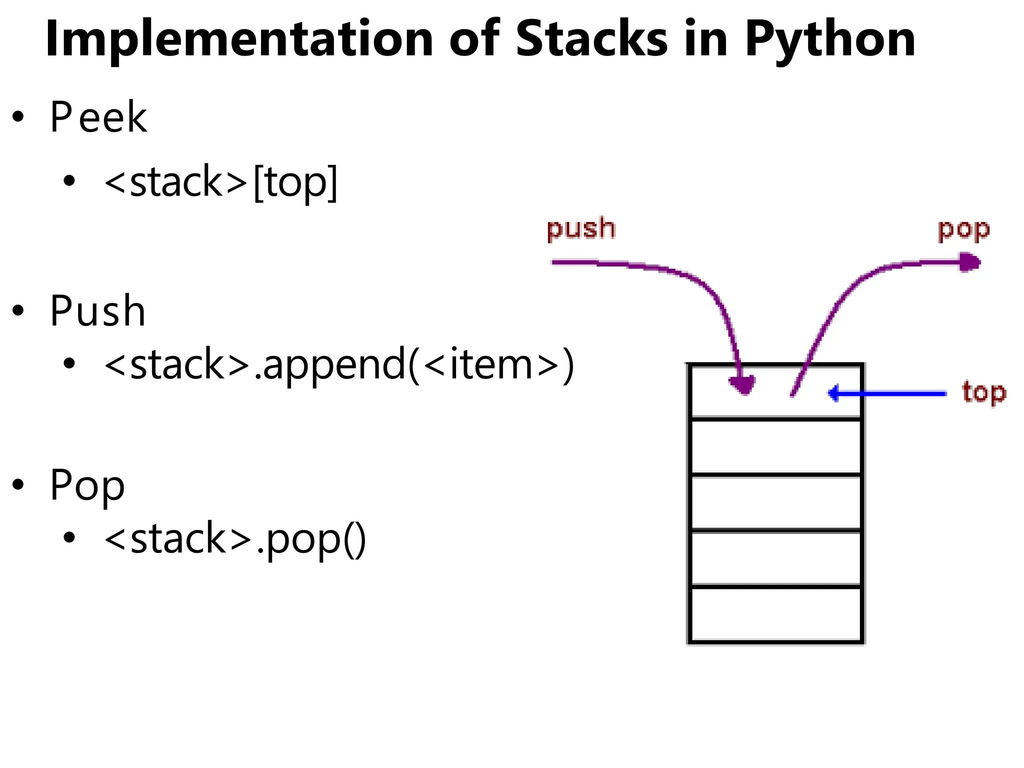
append(): Adds an element at the end of the list. It performs the PUSH operation.
pop(): Removes and returns the last element of the list. It performs the POP operation.
Example 1: Creating a Stack
stack = []

stack.append(10)
stack.append(20)
stack.append(30)

print(stack)
Output:
[10, 20, 30]Example 2: Performing POP Operation
stack = [10, 20, 30]

x = stack.pop()

print("Deleted Element:", x)
print("Remaining Stack:", stack)
Output:
Deleted Element: 30
Remaining Stack: [10, 20]
Example 3: Displaying the TOP Element
stack = [10, 20, 30]

print("Top Element:", stack[-1])
Output:
Top Element: 30Remember that stack[-1] accesses the last element without deleting it.
Example 4: Checking Whether a Stack is Empty
stack = []

if len(stack) == 0:
    print("Stack is Empty")
else:
    print("Stack is Not Empty")
Output:
Stack is Empty6. Complete Python Program to Implement Stack
The following program demonstrates the major stack operations using Python functions.
stack = []

def isEmpty(stack):
    return len(stack) == 0

def opPush(stack, element):
    stack.append(element)
    print("Element Pushed:", element)

def opPop(stack):
    if isEmpty(stack):
        print("Stack Underflow")
        return None
    else:
        return stack.pop()

def top(stack):
    if isEmpty(stack):
        print("Stack is Empty")
        return None
    else:
        return stack[-1]

def size(stack):
    return len(stack)

def display(stack):
    if isEmpty(stack):
        print("Stack is Empty")
    else:
        print("Stack Elements (Top to Bottom):")
        for i in range(len(stack)-1, -1, -1):
            print(stack[i])

# Main Program
opPush(stack, 10)
opPush(stack, 20)
opPush(stack, 30)

print("Stack Size:", size(stack))
print("Top Element:", top(stack))

display(stack)

print("Deleted Element:", opPop(stack))

display(stack)
Output:
Element Pushed: 10
Element Pushed: 20
Element Pushed: 30
Stack Size: 3
Top Element: 30
Stack Elements (Top to Bottom):
30
20
10
Deleted Element: 30
Stack Elements (Top to Bottom):
20
10
Important Python Functions Used in Stack
| Function | Purpose |
|---|---|
| append(x) | Inserts element x |
| pop() | Removes the last element |
| len(stack) | Returns stack size |
| stack[-1] | Accesses the top element |
| list() | Creates an empty list |
Note: Python lists grow dynamically, subject to available memory. Therefore, a list-based stack generally does not have a fixed capacity. However, popping from an empty list raises an IndexError unless it is checked first.
7. Reversing a String Using Stack
A stack can be used to reverse a string because it follows the LIFO principle.
Python Program
def reverse_string(text):
    stack = []

    for ch in text:
        stack.append(ch)

    result = ""

    while len(stack) > 0:
        result = result + stack.pop()

    return result

print(reverse_string("STACK"))
Output:
KCATSExplanation
- Each character is inserted into the stack.
- The last character is removed first.
- All removed characters are joined together.
- The resulting string is reversed.
8. Notations for Arithmetic Expressions
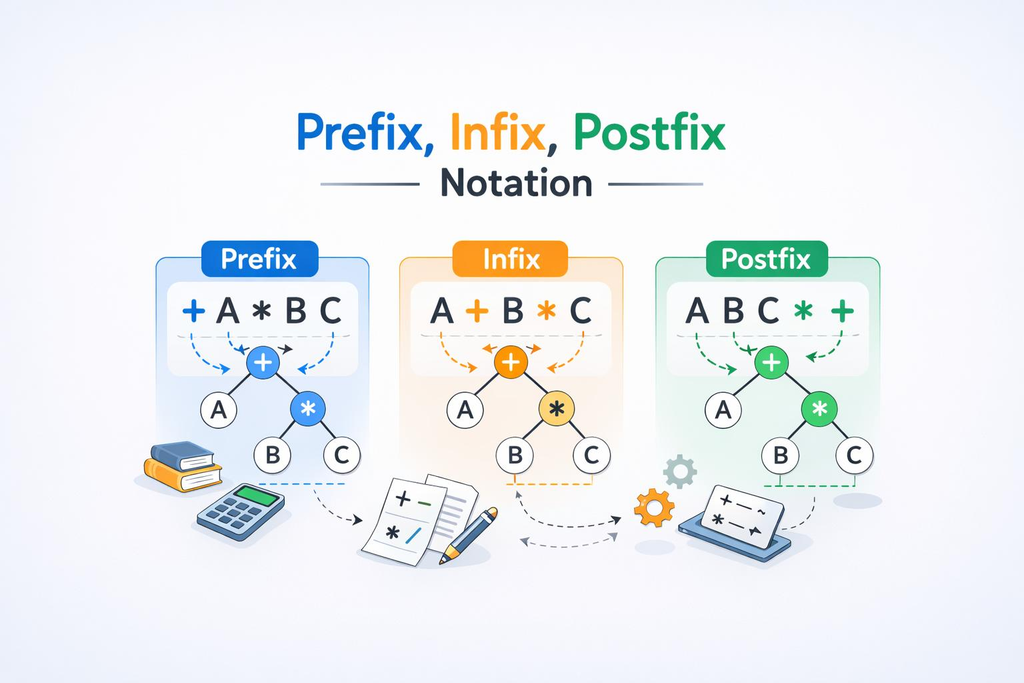
Arithmetic expressions can be represented in three different forms:
- Infix Notation
- Prefix Notation
- Postfix Notation
A. Infix Notation
In Infix notation, the operator is placed between the operands.
Example:
A + BOther examples:
A * B
A + B * C
(A + B) / C
This is the most commonly used notation in mathematics.
B. Prefix Notation
In Prefix notation, the operator is placed before the operands.
It is also known as Polish Notation.
Example:
A + B = + A BAnother example:
A * B = * A BC. Postfix Notation
In Postfix notation, the operator is placed after the operands.
It is also known as Reverse Polish Notation.
Example:
A + B = A B +Another example:
A * B = A B *Difference Between Infix, Prefix and Postfix
| Notation | Position of Operator | Example |
|---|---|---|
| Infix | Between operands | A + B |
| Prefix | Before operands | + A B |
| Postfix | After operands | A B + |
More Examples
| Infix | Prefix | Postfix |
|---|---|---|
| A + B | + A B | A B + |
| A – B | – A B | A B – |
| A * B | * A B | A B * |
| A / B | / A B | A B / |
| A + B * C | + A * B C | A B C * + |
Important: Prefix and Postfix expressions do not require parentheses to specify the order of evaluation when the operators and operands are properly arranged.
9. Operator Precedence
Operator precedence determines which operator should be evaluated first.
A commonly used precedence order is:
| Operator | Meaning | Priority |
|---|---|---|
| ( ) | Parentheses | Highest |
| ** | Exponentiation | High |
| *, /, //, % | Multiplication, division, etc. | Medium |
| +, – | Addition and subtraction | Low |
Operators having the same precedence are generally evaluated from left to right, except exponentiation, which is right-associative in Python.
10. Conversion from Infix to Postfix Notation
A stack is used to convert an arithmetic expression from Infix notation into Postfix notation.
During conversion:
- Operands are directly added to the postfix expression.
- Operators are temporarily stored in a stack.
- Parentheses control the order of operations.
- Operators are removed from the stack according to precedence rules.
Rules for Infix to Postfix Conversion
- Create an empty stack and an empty postfix expression.
- Scan the infix expression from left to right.
- If the scanned character is an operand, add it to the postfix expression.
- If it is an opening parenthesis
(, push it onto the stack. - If it is a closing parenthesis
), pop operators until the matching opening parenthesis is found. Discard both parentheses. - If it is an operator, pop operators of higher or equal precedence from the stack (subject to associativity), then push the new operator.
- After scanning the entire expression, pop all remaining operators and add them to the postfix expression.
Solved Example 1
Convert the following Infix expression into Postfix:
(A + B) * CStep-by-step conversion:
| Symbol | Action | Stack | Postfix |
|---|---|---|---|
| ( | PUSH | ( | |
| A | Add operand | ( | A |
| + | PUSH | ( + | A |
| B | Add operand | ( + | AB |
| ) | POP until ( | Empty | AB+ |
| * | PUSH | * | AB+ |
| C | Add operand | * | AB+C |
| End | POP remaining operator | Empty | AB+C* |
Final Answer:
AB+C*Solved Example 2
Convert:
(A + B) / (C * D)Step-by-step conversion:
| Expression | Postfix |
|---|---|
| A + B | AB+ |
| C * D | CD* |
| (A+B)/(C*D) | AB+CD*/ |
Final Answer:
AB+CD*/Solved Example 3
Convert:
A + B * CSince multiplication has higher precedence than addition, multiplication is performed first.
Final Postfix Expression:
ABC*+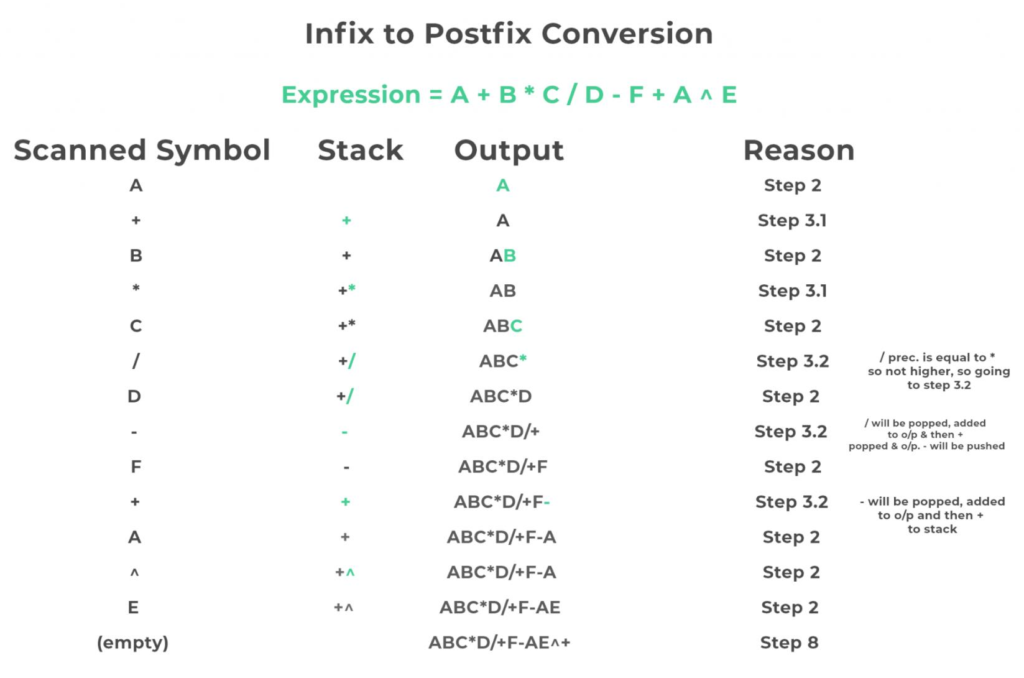
11. Evaluation of Postfix Expression
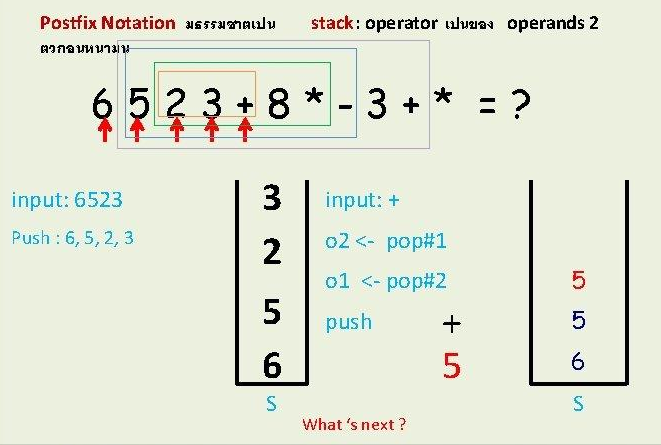
A stack can also be used to evaluate a postfix expression.
In postfix evaluation, we scan the expression from left to right.
Rules for Postfix Evaluation
- Create an empty stack.
- Scan the postfix expression from left to right.
- If the scanned item is an operand, PUSH it onto the stack.
- If the scanned item is an operator:
- POP the topmost operand.
- POP the next operand.
- Apply the operator to the second popped operand and then the first popped operand.
- PUSH the calculated result back onto the stack.
- After processing the complete expression, the stack should contain exactly one value.
- This remaining value is the final result.
Solved Example
Evaluate the following Postfix expression:
7 8 2 * 4 / +| Symbol | Operation | Stack |
|---|---|---|
| 7 | PUSH 7 | 7 |
| 8 | PUSH 8 | 7, 8 |
| 2 | PUSH 2 | 7, 8, 2 |
| * | 8 × 2 = 16 | 7, 16 |
| 4 | PUSH 4 | 7, 16, 4 |
| / | 16 ÷ 4 = 4 | 7, 4 |
| + | 7 + 4 = 11 | 11 |
Final Answer:
11Important: In postfix evaluation, the second popped operand is the left operand and the first popped operand is the right operand.
For example:
6 2 -The result is 6 – 2 = 4, not 2 – 6.
12. Important Differences: Stack and Queue
| Stack | Queue |
|---|---|
| Follows LIFO | Follows FIFO |
| Insertion is called PUSH | Insertion is called ENQUEUE |
| Deletion is called POP | Deletion is called DEQUEUE |
| Insertion and deletion take place at the same end | Insertion and deletion take place at different ends |
| Example: Pile of plates | Example: Queue at a ticket counter |
13. Important Definitions for Board Examination
1. Data Structure: A method of organising and storing data for efficient access and processing.
2. Stack: A linear data structure that follows the Last In, First Out (LIFO) principle.
3. TOP: The end of a stack from which insertion and deletion take place.
4. PUSH: The operation of inserting an element at the top of a stack.
5. POP: The operation of removing the topmost element from a stack.
6. Overflow: An error condition that occurs when an element is inserted into a full stack.
7. Underflow: An error condition that occurs when an element is deleted from an empty stack.
8. Infix Notation: A notation in which operators are placed between operands.
9. Prefix Notation: A notation in which operators are placed before operands.
10. Postfix Notation: A notation in which operators are placed after operands.
11. LIFO: Last In, First Out.
12. FIFO: First In, First Out.
14. Important Questions for CBSE Class 12
Very Short Answer Questions
- What is a stack?
- What is the full form of LIFO?
- Define PUSH operation.
- Define POP operation.
- What is Stack Overflow?
- What is Stack Underflow?
- Which Python function is used to insert an element into a list-based stack?
- Which Python function is used to remove the last element from a list?
- What is the TOP of a stack?
- What is Postfix notation?
Short Answer Questions
- Explain the working principle of a stack with an example.
- Differentiate between PUSH and POP operations.
- Explain Stack Overflow and Stack Underflow.
- Write any four applications of stack.
- Differentiate between Infix, Prefix and Postfix notations.
- Explain how a Python list can be used to implement a stack.
- What is the role of a stack in browser history?
- Explain how a stack is used to reverse a string.
Programming Questions
- Write a Python program to implement PUSH and POP operations.
- Write a Python function to check whether a stack is empty.
- Write a Python program to display the topmost element of a stack.
- Write a Python program to reverse a string using a stack.
- Write a Python program to display all elements of a stack from TOP to BOTTOM.
- Write a Python program to calculate the size of a stack.
Expression-Based Questions
- Convert
(A+B)*Cinto Postfix notation. - Convert
A+B*Cinto Postfix notation. - Convert
(A+B)/(C-D)into Postfix notation. - Evaluate
5 3 + 2 *. - Evaluate
8 4 / 3 +. - Explain the procedure for converting Infix notation into Postfix notation.
15. Quick Revision – Chapter 3 Stack
| Concept | Remember |
|---|---|
| Stack | Linear Data Structure |
| Principle | LIFO |
| Insertion | PUSH |
| Deletion | POP |
| Top Element | stack[-1] |
| Insert in Python | append() |
| Delete in Python | pop() |
| Full Stack Error | Overflow |
| Empty Stack Error | Underflow |
| Infix | Operator between operands |
| Prefix | Operator before operands |
| Postfix | Operator after operands |
| String Reversal | Using PUSH and POP |
| Infix to Postfix | Using a stack |
| Postfix Evaluation | Using a stack |
Conclusion
Stack is an important concept in Computer Science and Python programming. Understanding the LIFO principle, PUSH and POP operations, and implementation using Python lists will help students develop a strong foundation in data structures.
Students should practise writing Python programs, tracing stack operations and solving Infix-to-Postfix conversion and Postfix evaluation problems.
Regular revision of these concepts will help improve problem-solving skills and examination performance.
Keep learning and keep practising with The Study Smart!
About The Study Smart
The Study Smart provides educational notes, CBSE study materials, Computer Science resources, programming tutorials and entrance examination preparation support for students.
Disclaimer: These notes are independently prepared for educational and revision purposes using the referenced learning resources. Students should also refer to their prescribed NCERT textbook and the latest official CBSE syllabus and examination guidelines.