









(CBSE Class XII – Computer Science / Informatics Practices)
Networking Devices, Network Topologies & Network Protocols
1. Networking Devices
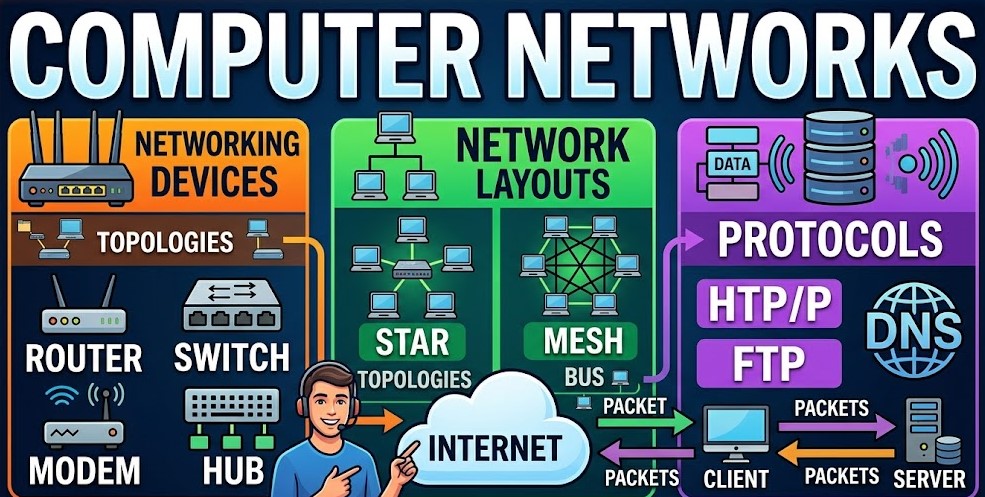
We use Networking Devices to connect computers and other devices in a network. These are hardware components that help us make a network.
1.1 Modem (Modulator-Demodulator)
A Modem converts signals to analog and analog to digital. We use a Modem for internet connectivity via telephone lines. For example we have DSL modem and cable modem.
1.2 Hub
A Hub is a Networking Device that connects multiple computers. It works on the Physical Layer. When a Hub gets data it sends this data to all devices. This is not very efficient. A Hub does not filter data.
1.3 Switch
A Switch is more advanced than a Hub. It works on the Data Link Layer. A Switch sends data to the device that needs this data. It uses the devices MAC address to do this. This makes the network more efficient.
1.4 Router
A Router connects networks like a Local Area Network to the Internet. It works on the Network Layer. A Router uses IP addresses to send data to the place. For example we use a Home Wi-Fi router.
1.5 Repeater
A Repeater helps when signals are weak. It regenerates these signals. We use a Repeater to extend the distance of a network.
1.6 Bridge
A Bridge connects networks that’re similar. It filters traffic based on the MAC address of devices.
1.7 Gateway
A Gateway acts like a protocol converter. It helps different networks communicate with each other. For example it connects a Local Area Network with networks.
1.8 Access Point (AP)
An Access Point provides connectivity, like Wi-Fi. It extends a wired network into a network.
2. Network Topologies
The way devices are set up in a network is called the network topology.
Network topology is the way devices are arranged in a network.
2.1 Bus Topology
- All the devices in a bus topology are connected to one cable.
- The main advantages of a bus topology are that it is easy to set up. It does not cost a lot of money.
- The disadvantages of a bus topology are that if the main cable fails the whole network will stop working and it is hard to find faults.
2.2 Star Topology
- In a star topology all the devices are connected to a device.
- The advantages of a star topology are that it is easy to manage and if there is a fault it’s easy to find.
- The disadvantages of a star topology are that if the central device fails the whole network will stop working and more cables are needed.
2.3 Ring Topology
- In a ring topology the devices are connected in a circle.
- The data in a ring topology travels in one direction.
- The advantages of a ring topology are that the data does not collide with each other.
- The disadvantages of a ring topology are that if one device fails the whole network will be affected.
2.4 Mesh Topology
- In a mesh topology every device is connected to every device.
- The advantages of a mesh topology are that it is very reliable and there is no loss of data.
- The disadvantages of a mesh topology are that it is expensive and the installation is complex.
2.5 Tree Topology
- A tree topology is a combination of a star topology and a bus topology.
- It has a structure and it is used in large networks.
- Network topology like tree topology is used for networks.
2.6 Hybrid Topology
- A hybrid topology is a combination of two or more network topologies.
- The hybrid topology is flexible. It can be scaled up.
- Network topology, like hybrid topology is very flexible and scalable.
3. Network Protocols
The rules that help devices in a network talk to each other are called Network Protocols.
3.1 HTTP (HyperText Transfer Protocol)
- We use HTTP to move web pages from one place to another.
- It works on something called port 80.
3.2 HTTPS (Secure HTTP)
- This is like HTTP. It is more secure.
- It uses something called encryption to keep things like SSL/TLS.
- It works on port 443.
3.3 FTP (File Transfer Protocol)
- We use FTP to move files over the Network.
- To use it we need to login with our username and password.
3.4 SMTP (Simple Mail Transfer Protocol)
- We use SMTP to send emails to our friends.
3.5 POP3 (Post Office Protocol)
- We use POP3 to get emails from the server and download them to our computer.
3.6 IMAP (Internet Message Access Protocol)
- IMAP lets us look at our emails on the server without downloading them.
- Our emails stay on the server so we can see them from any device.
3.7 TCP/IP (Transmission Control Protocol / Internet Protocol)
- TCP/IP is the base of how the internet works.
- TCP makes sure our data gets to where it needs to go
- IP helps figure out where our data needs to go and how to get it there.
3.8 UDP (User Datagram Protocol)
- UDP is faster than TCP. It is not as good at making sure our data gets to where it needs to go.
- We use UDP when we are streaming videos or playing games online.
3.9 DNS (Domain Name System)
- DNS helps us use easy to remember names, like google.com of hard to remember IP addresses.
- For example when we type google.com it uses DNS to find the IP address of the google server.
4. Comparison Table (Important for Exams)
| Device | Function | Layer |
|---|---|---|
| Hub | Broadcast data | Physical |
| Switch | Filters data using MAC | Data Link |
| Router | Routes data using IP | Network |
| Repeater | Amplifies signals | Physical |
| Bridge | Connects similar networks | Data Link |
5. Important Exam Tips
- When you are studying for your exam it is an idea to draw diagrams for topologies.
- This will help you understand things better.
- You should also learn the advantages and disadvantages of things.
- Remember the forms of protocols like TCP and UDP and others.
- It is also an idea to practice questions that ask about the differences between things.
- For example you should practice questions like Hub versus Switch and TCP versus UDP and POP3, versus IMAP.
These are things to know for your exam so make sure you practice them.