









CHAPTER-8 COMPUTER NETWORKS
8.1 Evolution of Networking:
8.1.1 Introduction to Computer Networks:
Network: – To connect the more than one devices via a medium, is called network.

Why do we need network?
1. Fast and Secure Communication
2. Resource sharing
3. Reduce Cost
8.1.2 Evolution of Network:
ARPANET: The Advanced Research Projects Agency Network (ARPANET) was an early packet switching network and the first network to implement the protocol suite TCP/IP. Both technologies became the technical foundation of the Internet.
NSFNET:
§ The National Science Foundation Network (NSFNET) was a program created and funded by the National Science Foundation to coordinate and promote advanced research and education in networking in the United States.
§ NSFNET was founded in 1985. NSFNET was a general purpose research network wherein the connection is not limited to the super computer centers, it was to serve as
a backbone connection for regional networks at every supercomputing site and use ARPANET’s TCP/IP protocol.
§ In 1986, the super computer centers were officially connected and it became open to all academic networks.
§ The NSF decided to transfer the operations of NSFNET to the private sector in the midst of the rapid growth of the network. NSFNET was officially dissolved on October 30, 1995.
Internet: A network of networks.
WWW: World Wide Web started on 6th August 1991, started by ‘ Berners Lee’ .
Interspace: Interspace is a client/server software program that allows multiple users to communicate online with real-time audio, video and text chat in dynamic 3D environments. Interspace provides the most advanced form of communication available on the Internet today.
8.2 Communication Terminologies:
Channel: A channel is a separate path through which signals can flow. A channel has a certain capacity for transmitting information, often measured by its bandwidth in Hz or its data rate in bits per second.
Bandwidth: Bandwidth refers to the amount of information that can be transmitted over a network in a given amount of time, usually expressed in bits per second or bps.
Data Transfer Rate: The data transfer rate of a computer network connection is normally measured in units of bits per second (bps).
Larger units are Kbps, Mbps and Gbps, KBps, MBps,GBps bps means bit per second.
Bps means Byte per second
1 kilobit per second (Kbps) = 1000 bits per second (bps).
1 megabit per second (Mbps) = 1000 Kbps or 10002 bps.
1 gigabit per second (Gbps) = 1000 Mbps
1 Terabit per second (Tbps) = 1000 Gbps
8.3 Switching Techniques:
It is a way to send a message from sender to receiver. Information may be switched as it travels through various communication channels. There are three typical switching techniques available for digital traffic.
• Circuit Switching
• Packet Switching
• Message Switching
| Circuit Switching | Packet Switching |
| Requires point to point connections during calls. | Sends data in small blocks, called packets. Packets reassembled in proper sequence at the receiver end. |
| Required dedicated connection | Not required dedicated connection |
| Circuit-switched networks were used for phone calls | packet-switched networks handled data |


8.4 Transmission Medium:
A medium which is used to connect the devices and transfers the data from one device to another device.


8.5 Network Devices:
1. Modem
2. Hub
3. Switch
4. Gateway
5. Bridge
6. Router
7. Repeater
8. NIC (Network Interface Card)
9. RJ45 Connector
1. Modem:
Ø The full form of modem is Modulator and demodulator.
Ø A modem is a device or program that enables a computer to transmit data over telephone or cable lines.
Ø A modem converts analog signal to digital signal and vice- versa.
Ø Modem connects computer to internet.
Ø There are two types of modem:
a. Internal Modem
Computer Hardware
b. External Modem

Fig. : Working of Modem
2. Hub:
• A network device that contains multiple ports.
• Provides multiple connections.
• When a packet arrives at one port, it is copied to the other ports so that all segments of the LAN can see all packets.
• Two types of hub :
a. Active Hub

Fig: Hub Fig. : Active and Passive Hub
3. Switch:
• A switch is called smart hub.
• Provides multiple connections
• A device that filters and forwards packets between LAN segments.

Fig: Switch
| HUB | SWITCH |
| Hub passes the frame to every port. | Passes the frame to a specific port, because it keeps a record of MAC address. |
| Creates lot of traffic on network | Less traffic |
| Hub shares its bandwidth with each and every port, so bandwidth divided among all the nodes, which will degrade performance. | Switch allocates full bandwidth to each of its port. So user always access maximum amount of bandwidth. |
| Slow speed | Fast speed |
4. Gateway:
A gateway is a network point that acts as an entrance to another network. Used to connect two dissimilar networks.

5. Bridge:
A device that connects two local-area networks (LANs), or two segments of the same LAN that use the same protocol, such as Ethernet.

6. Router:
• A router is a device that forwards data packets along networks. A router is connected to at least two networks, commonly two LANs or WANs. Routers are located at gateways, the places where two or more networks connect.
• A router acts as a dispatcher, choosing the best path for information to travel so it’s received quickly.

7. Repeater:
Network repeaters regenerate and amplify the weak signals to transmit the information for long distance.

8. NIC (Network Interface Card): NIC card has a physical address of a system; this physical address known as MAC address.
A MAC address is a 6- byte address with each byte separated by a colon. First 3-bytes have Manufacturer id and last 3-bytes represent Card id. 10:BE:05:56:3F:CB
9. RJ45 Connector: It is used for connecting computers onto Ethernet-based local area networks (LAN). RJ stands for Registered Jack. It is a standardize networking interface. 45 is the number of the interface standard. It has 8-pins.

8.6 Types of Network:
1. Local Area Network (LAN)
2. Metropolitan Area Network (MAN)
3. Wide Area Network (WAN)
4. Personal Area Network (PAN)
1. LAN:
*Use in small local area, like in an institute or an organization.
* Devices are connected via physical medium.
* Limited distance, up to 150 Meter.
* Example – Intranet
2. MAN:
* Larger than LAN.
* Used in Metropolitan cities. *Range up to 50 KM.
3. WAN:
* Large network
* Public
* Example – Internet
4. PAN:
* For very small distance
* Private Communication
* Example: Bluetooth
8.7 Network Topology:
The term Topology refers to the way/layout in which the various nodes or computers of a network are linked together.
The following factors are considered while selecting a topology:
ü Cost
ü Reliability
ü Bandwidth capacity
ü Ease of installation
ü Ease of troubleshooting
ü Delay involved in routing information from one node to another.
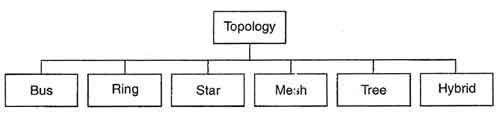
8.7.1 Types of Topologies

1. Bus Topology
It consists of one continuous length of cable (trunk) that is shared by all the nodes in the network and a terminating resistor (terminator) at each end that absorbs the signal when it reaches the end of line. Without a terminator the electrical signal would reach the end of copper wire and bounce back, causing errors on the network.
Data communication message travels along the bus in both directions until it is picked up by a workstation or server NIC. If the message is missed or not recognized, it reaches the end of the cabling and dissipates at the terminator. Bus Network Topology requires a multipoint connection.
| Advantages | Disadvantages |
| 1. Easy to install and the use for small networks.2. Requires less cable 3. Failure of one node does not affect the network functioning.4. Cost is less5. New node can be easily added | 1. If the main cable fails the entire network collapses.2. Difficult to reconfigure, due to more connections.3. Difficult to troubleshoot 4. Slow, due to traffic on single cable5. Only one device transmits at a time, other devices wait for their turn. |
2. Ring Topology
| Advantages | Disadvantages |
| 1. Easy to troubleshoot 2. There is no master computer on controller. 3. There are no collisions.4. Fast speed5. Easy fault detection and isolation | 1. Requires more cable2. More Expensive3. A break in cable ring brings down entire network4. Data flows in single direction |
The physical ring Topology is a circular loop of point-topoint links. Message travel around the ring from node to node in a very organized manner. Each workstation checks the message for a matching destination address. If the address doesn’t match the node simply regenerates the message and sends it on its way. If the address matches, the node accepts the message and sends a reply to the originating sender.

3. Star Topology
The physical star Topology uses a central controlling hub with dedicated legs pointing in all directions – like points of a star. Each network device has a dedicated point-to-point link to the central hub. There is no direct link between these computers and the computers can communicate via central controller only.

| Advantages | Disadvantages |
| 1. Easier to add new node or modify any existing node without disturbing network.2. Fast Speed 3. If any local computer or link fails, the entire system does not collapse4. Easy fault detection and isolation5. Central node control | 1. Central node dependency. If the central controller or hub fails, entire system collapses.2. Cabling cost is more3. Difficult to install |
4. Mesh Topology
In mesh topology, each node is connected to every other node in the network i.e. each node has a dedicated point to point link to every other node as shown. Dedicated means that the link carries the traffic only between two devices it connects.
In this way there exist multiple paths between two nodes of the network. In case of failure of one path, the other one can be used.

| Advantages | Disadvantages |
| 1. It is robust. Failure of one node does not collapse the entire system. 2. No traffic congestion 3. Dedicated links ensure faster transmission 4. Point to point links makes fault identification and isolation easier. | 1. Network installation and reconfiguration difficult.2. High cabling cost. If there are n nodes in the network then each node has (n-1) connections. |
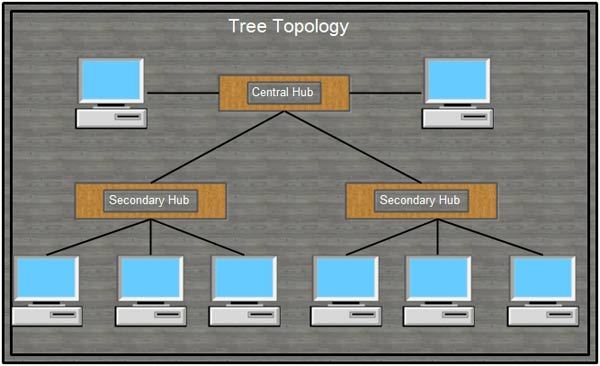
5. Tree Topology
This topology has Hierarchical structure. This topology connects the node via hubs. Hub, which is present at top level, is called root hub or active hub. Another hub is called secondary hub or passive hub.

| Advantages | Disadvantages |
| 1. New node can be added easily.2. Signal can travel for long distance.3. Isolate and prioritize communication. | 1. If the backbone line breaks, the entire segment goes down.2. More difficult to configure3. Higher cabling cost |
6. Hybrid Topology:
It is a composition of more than one topology.

8.8 Network Protocol:
1. TCP: Transmission Control Protocol – 4 layers
| Application Layer |
| Transport Layer |
| Internet |
| Network Interface |
2. IP: Internet Protocol
Each computer has unique address over internet, is called IP address. An IP address is an identifier for a computer or device on a TCP/IP network.

Two types:
I. IPv4 (32-bits or 4-bytes) : IPv4 addresses are canonically represented in dotdecimal notation, which consists of four decimal numbers, each ranging from 0 to 255, separated by dots, e.g., 192.168.1.1.
II. IPv6 (128-bits or 16-bytes)
3. FTP (File Transfer Protocol): use to transfer files from one computer to another computer.
4. PPP (Point to Point Protocol)
5. HTTP( HyperText Transfer Protocol): To transfer the hypertext pages over internet.
6. Telnet (TELecommunication NETwork) : A network protocol that allows a user on one computer to log into another computer(remote) that is part of the same network or on the internet.
Discover more
Maths
Science
Communication Skills
7. GSM: GSM (Global System for Mobile communication) is a digital mobile telephony system that digitizes and compresses data, then sends it down a channel with two other streams of user data, each in its own time slot.
8. CDMA: Code Division Multiple Access (CDMA) is a digital air interface standard, claiming eight to fifteen times the capacity of traditional analog cellular systems.
Each user is separated by a unique code; all users can share the same frequency band.
CDMA is a spread spectrum technology, which means that it spreads the information contained in a particular signal of interest over a much greater bandwidth than the original signal.
9. GPRS: General Packet Radio Service is a packet-switching technology that enables data transfers through cellular networks (wireless). It is used for mobile internet, MMS and other data communications. In theory the speed limit of GPRS is 115 kbps, but in most networks it is around 35 kbps.
Discover more
Mathematics
Computer
Communications & Media Studies
10. WLL: Wireless Local Loop is a system that connects subscribers to the local telephone station wirelessly.

Fig. : Architecture of WLL
FSU : Fixed Subscriber Unit BSC : Base Station Controller BTS: Base Transceiver Station
11. VoIP : VoIP (voice over IP) is the transmission of voice and multimedia content over Internet Protocol (IP) networks. This protocol is used for chat and video conferencing over internet.
8.9 Mobile Telecommunication Technologies:
Firstly, when wireless generation started, it was analog communication. That generation is 1G. They used various analog modulation for data transfer. Now when the communication migrated from analog to digital, the foundation of latest communication were led. Hence came 2G.
1G Technology:
• 1G refers to the first generation of wireless telephone technology, mobile telecommunications which was first introduced in 1980s and completed in early 1990s. It’s Speed was upto 2.4kbps, allowed the voice calls in one country.
• It used Analog Signal and AMPS was first launched in USA in 1G mobile systems

• Poor Voice Quality
• Poor Battery Life
• Large Phone Size
• No Security
• Limited Capacity
• Poor Handoff Reliability
2G Technology:
• 2G technology refers to the 2nd generation which is based on GSM. It was launched in Finland in the year 1991 and used digital signals.
• It’s data speed was upto 64kbps.

Features include:
• It enables services such as text messages, picture messages and MMS (multi media message).
• It provides better quality and capacity.
Drawbacks:
• 2G requires strong digital signals to help mobile phones work. If there is no network coverage in any specific area, digital signals would weak.
• These systems are unable to handle complex data such as Videos.
3G Technology:
• 3G technology refer to third generation which was introduced in year 2000s.
• Data Transmission speed increased from 144kbps- 2Mbps.
Discover more
Math
Communication Skills
Mathematics
• Typically called Smart Phones and features increased its bandwidth and data transfer rates to accommodate web-based applications and audio and video files.

Features Include:
• Providing Faster Communication
• Send/Receive Large Email Messages
• High Speed Web / More Security
• Video Conferencing / 3D Gaming
• TV Streaming/ Mobile TV/ Phone Calls
• Large Capacities and Broadband Capabilities
• 11 sec – 1.5 min. time to download a 3 min Mp3 song.
Drawbacks:
• Expensive fees for 3G Licenses Services
• It was challenge to build the infrastructure for 3G High Bandwidth Requirement Expensive 3G Phones.
• Large Cell Phones
4G Technology:
• 4G technology refer to or short name of fourth Generation which was started from late 2000s.
• Capable of providing 100Mbps – 1Gbps speed.
• One of the basic term used to describe 4G is MAGIC.

Features Include:
• Mobile Multimedia
• Global Mobility Support
• Integrated Wireless Solution
• Customized Personal Services
• Also known as Mobile Broadband Everywhere
• The next generations of wireless technology that promises higher data rates and expanded multimedia services.
• Capable to provide speed 100Mbps-1Gbps.
• High QOS and High Security
• Provide any kind of service at any time as per user requirements, anywhere.
• More Security
• High Speed
• High Capacity
• Low Cost Per-bit
Drawbacks:
• Battery uses is more
• Hard to implement
• Need complicated hardware
• Expensive equipment required to implement next generation network.
5G Technology: Introduced in 2020
o Faster than 4G.
o Gateway for Internet of Things (IoT) o More secure than 4G
o Un-interrupted and Reliable o Less latency than 4G. o Less interference and better efficiency o Cloud based computing
The basic difference between 3G, 4G and 5G is in data transfer and signal quality.
| 3G | 4G | 5G | |
| Data Transfer Rate | 3.1 MB/sec | 100 MB/sec | >1Gbps |
| Internet Services | Broadband | High Broadband | Ultra Broadband |
| Mobile – TV Resolution | Low | High | Very High |
| Frequency | 1.6-2 GHz | 2-8 GHz | 25 GHz |
| Download and upload | 5.8 Mbps | 14 Mbps | 200-400 Mbps |
| Latency | 100-500 milliseconds | 20-30 milliseconds | < 10 milliseconds |
8.10 Introduction to web services:
8.10.1 WWW: World Wide Web is an information system where websites and webpages are interconnected and accessible through URL. It is also known as Web.
8.10.2 HTML: HTML is the standard markup language for creating Web pages.
• HTML stands for Hyper Text Markup Language
• HTML describes the structure and design of Web pages using markup
• HTML elements are represented by tags
• Browsers do not display the HTML tags, but use them to render the content of the page The current version of HTML is HTML 5.0
A simple HTML Code: OUTPUT

8.10.3 XML :
• XML stands for EXtensible Markup Language
• XML is a markup language much like HTML
• XML was designed to store and transport data
• XML was designed to be self-descriptive XML is a W3C Recommendation
| S.No. | HTML | XML | ||||||
| 1 | HyperText Markup Language. | eXtensible Markup Language. | ||||||
| 2 | Designed to display data with focus on how data looks. | XML was designed to be a software and hardware independent tool used to transport and store data, with focus on what data is. | ||||||
| 3 | HTML is case insensitive. | XML is case sensitive. | ||||||
| 4 | HTML is used for designing a web-page to be rendered on the client side. | XML is used basically to transport data between the application and the database. | ||||||
| 5 | HTML has its own predefined tags. | Uses custom tags defined by the user. | ||||||
| 6 | HTML is not strict if the user does not use the closing tags. | XML makes it mandatory for the user the close each tag that has been used. | ||||||
| 7 | HTML does not preserve white space. | XML preserves white space. | ||||||
| 8 | HTML is about displaying data, hence static. | XML is about carrying information hence dynamic. | ||||||
8.10.4 Domain Name:
Domain names are used to identify one or more IP addresses. Domain names are used in URLs to identify particular web page.
For example, http://www.kvongcbrd.com/english-results.htm
Every domain name has a suffix that indicates which top level domain (TLD) it belongs to. There are only a limited number of such domains. For example:
§ gov – Government agencies
§ edu – Educational institutions
§ org – Organizations (nonprofit)
§ mil – Military
§ com – commercial business
§ net – Network organizations
§ in – India
§ th – Thailand
Because the Internet is based on IP addresses, not domain names, every Web server require a Domain Name System (DNS) server to translate domain names into IP addresses.
8.10.5 URL: Uniform Resource Locator. It is the global address of documents and other resources on the World Wide Web.
8.10.6 Website: Collection of web pages which are interlinked to one another. These pages are hypertext pages and link between pages is known as hyperlink.
8.10.7 Web browser: It is application software though which user can access internet. Example: internet explorer, Google chrome, Mozilla Firefox, opera, UC browser
8.10.8 Web Server: A web server is a system that uses HTTP to accept request and serve the web pages as response to users. Every web server has IP address.
Example: Apache web server, Microsoft’s Internet Information Server (IIS) and nginx (pronounced engine X) from NGNIX.
8.10.9 Web Hosting:
o Web hosting is a service that allows organizations and individuals to post a website on to the Internet.
o A web host, or web hosting service provider, is a business that provides the technologies and services needed for the website or webpage to be viewed in the Internet. Websites are hosted, or stored, on special computers called servers.