









The present day office environment is characterized by speed, collaboration, and the endless switch between various applications. With emails, spreadsheets, project management applications, and customer relationship management applications, workers tend to switch between different applications just to get a single job done. This not only leads to wasted time but also causes lack of focus and productivity issues. The solution to such problems is provided by Microsoft 365 Copilot.
Challenge: Excessive Tools, Limited Interactivity
With the growing number of digital tools utilized by companies for optimization over the last years, problems arise due to a lack of interconnectivity. Employees waste precious time searching for the necessary data and performing redundant actions such as transferring files between programs.
AI-driven agents change the playing field significantly. Rather than making employees learn how to use the plethora of software tools, these programs adapt to the users’ needs by providing an interactive experience right inside of their working process.
What are Microsoft 365 Copilot Agents?
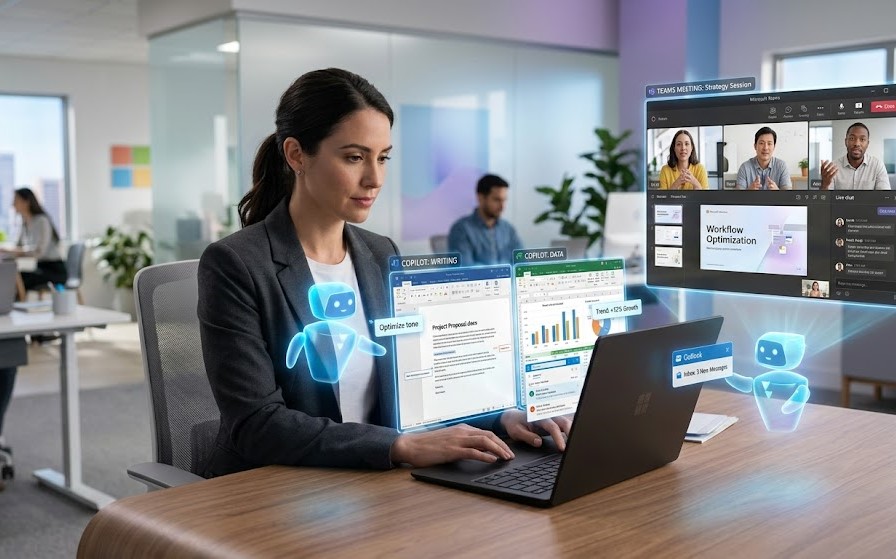
Microsoft 365 Copilot agents are AI-based tools that perform tasks for people inside various Microsoft products such as Word, Excel, Outlook, and Teams. Contrary to standard automation software, these agents are capable of not only completing assigned actions but also providing assistance to users.
Agents are proactive, contextual, conversational, and can make decisions based on the situation at hand.
Integration Throughout Applications
Another strong point about Copilot agents is that they are able to work across several applications at once. For instance:
- An agent is collecting live information during the writing of a report in Word from Excel.
- It is also able to summarize and delegate action items during the process of discussion in Teams.
- It also drafts replies in Outlook using information from previous correspondences and documents.
All in all, this approach makes switching between various apps unnecessary, allowing for a seamless and uninterrupted flow of work.
Automation of Repetitive Tasks
The main problem that slows down the working process of a company is the presence of repetitive tasks that eat away the productive time of staff. This includes tasks such as data input, report preparation, and scheduling of meetings.
Thanks to agents, these tasks can be done automatically without much effort. Some examples would be:
- Creating weekly reports based on information from multiple sources.
- Scheduling meetings depending on people’s availability.
- Updating the customer record in the CRM system following a conversation.
Improving Decision Making Using AI
Making informed decisions promptly has become increasingly important in the current information age. With the help of Copilot agents, you can quickly analyze a large amount of data and get actionable insights delivered to you in a simpler way.
Let’s say you work with Excel and need some recommendations about how your company is going to perform in the next months or what trends there are. The agent will do all the work for you and provide recommendations or summaries within seconds.
Personalization Based on Context
Another advantage of using Copilot agents is that they have the capability to understand context and thus personalize their assistance according to it.
Here are some examples:
- Suggesting appropriate documents during meetings
- Classifying emails according to priority
- Recommendations depending on users’ previous actions
Smarter Collaboration
Collaboration is central to any work environment today. Agents help improve collaboration by keeping teams in the loop at all times.
The use of agents in Microsoft Teams allows for:
- Summarizing conversations
- Marking important points
- Noting down actions and their deadlines
This helps to avoid misunderstanding and keeps teams updated on each other.
Security and Compliance
With the advent of AI in business processes, the aspect of security and compliance becomes an essential one. Microsoft has ensured the highest level of enterprise security in its creation of Copilot.
Agents function within the security infrastructure set up in the organization. They do not violate any permissions or compliance norms set by the organization.
Use Cases for Real World
1. Sales Departments
Salespersons could leverage Copilot agents to:
- Brief themselves before meetings based on previous meetings.
- Draft proposals using information from CRMs.
- Send personalized emails as a follow-up.
2. Marketing Departments
Marketers could:
- Write quick drafts for content.
- Analyze marketing campaigns.
- Collaborate on strategies in real-time.
3. Finance Departments
Finance professionals could leverage:
- Automatic financial reporting.
- Data analysis and forecasts.
- Spot errors in spreadsheets.
4. HR Departments
HR departments could:
- Simplify recruitment processes.
- Write employee reports.
- Communicate within the department more efficiently.
The Future of Work with AI Agents
The incorporation of agents into Microsoft 365 Copilot represents a revolution in the way work is done. Rather than mere utilities, applications transform into co-workers.
With the ongoing development of AI, these agents will continue to advance. They will take on increasingly complex processes, interact with more systems, and offer more valuable insights. The objective is not to minimize human labor but to amplify its impact.
Key Advantages at a Glance
- Boosted Productivity: Fewer hours consumed by tedious chores
- Elevated Concentration: Minimized transitions between apps
- Insightful Decision-making: Data-based suggestions from AI
- Superior Cooperation: Automated notifications and overviews
- Tailored Service: Information-aware guidance
Potential Obstacles and Precautions
Despite their clear advantages, organizations should also be prepared for:
- Employee training to efficiently utilize AI technology
- Data quality to produce reliable insights
- Transformation management due to changing workflows
Implementing Copilot agents necessitates a structured strategy.
Conclusion
Microsoft 365 Copilot agents are revolutionizing the way people work by embedding business applications in the context of the workflow. Through AI integration with popular applications such as Microsoft Word, Microsoft Excel, Microsoft Teams, and Microsoft Outlook, Microsoft has created an intelligent environment where users can work seamlessly.
The future of work does not involve working harder; instead, the goal is to make work smarter. Intelligent agents will perform mundane tasks and provide insights, thereby allowing workers to concentrate on innovation and strategy.