The Study Smart | CBSE Class 12 Computer Science
Welcome to The Study Smart! In this chapter, we will learn about File Handling in Python through easy explanations, practical examples, important Python programs, revision tables and examination-oriented questions.
1. Introduction to File Handling
In Python, variables store data temporarily in computer memory (RAM). When a program stops executing, the data stored in variables is generally lost.
File Handling allows us to store information permanently in files and retrieve it whenever required.
Example: A school maintains student records, marks, attendance and fee details. These records must remain available even after the computer is switched off.
Advantages of File Handling
- Permanent storage of information.
- Easy retrieval of previously stored data.
- Reduces repeated data entry.
- Helps manage large amounts of information.
- Allows data sharing between programs.
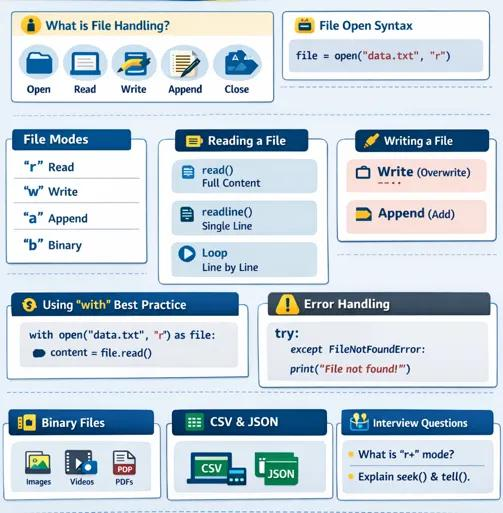
2. Types of Files in Python
Python mainly supports two types of files:
- Text Files
- Binary Files
2.1 Text Files
A text file stores information in the form of readable characters, numbers and symbols. These files can be opened using text editors such as Notepad.
Examples: student.txt, marks.txt, notes.txt and data.csv.
Example:
Name: Rahul
Class: 12
Subject: Computer Science
Marks: 95
2.2 Binary Files
Binary files store information in the form of bytes. They are not directly human-readable through ordinary text editors.
Examples: Images, audio files, video files and Python object files (.dat).
Difference Between Text and Binary Files
| Text File | Binary File |
|---|---|
| Stores readable characters. | Stores data as bytes. |
| Human-readable. | Not directly human-readable. |
| Uses text mode. | Uses binary mode. |
| Example: .txt, .csv | Example: .dat, images, audio |
3. Opening a File in Python
Before performing any operation on a file, we must open it. Python provides the built-in open() function.
Syntax:
file_object = open("filename", "mode")Example:
f = open("student.txt", "r")Important File Attributes
| Attribute | Description |
|---|---|
| f.name | Returns the file name. |
| f.mode | Returns the file opening mode. |
| f.closed | Returns True if the file is closed. |
Example:
f = open("student.txt", "r")

print(f.name)
print(f.mode)
print(f.closed)

f.close()
4. Closing a File
After completing file operations, we should close the file using the close() method.
f = open("student.txt", "w")
f.write("Welcome to The Study Smart")
f.close()
Using the with Statement
The with statement automatically closes a file after the block finishes.
with open("student.txt", "r") as f:
    data = f.read()
    print(data)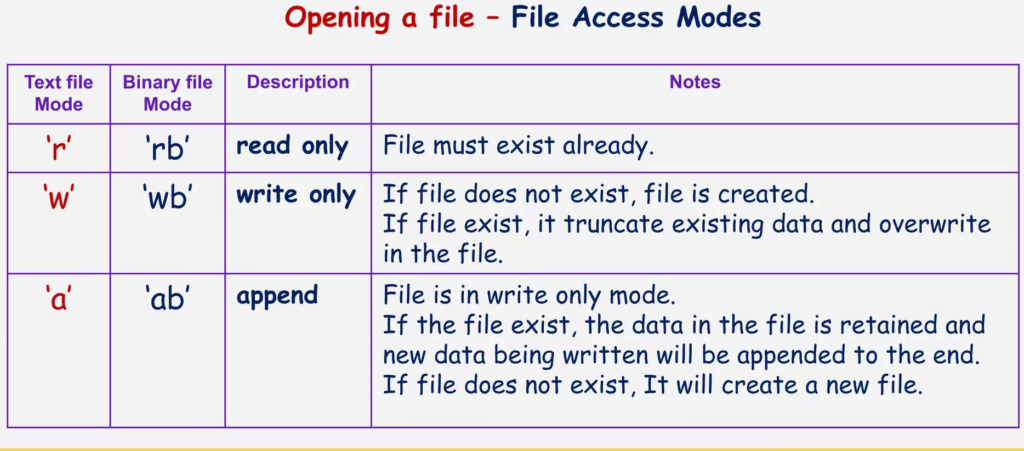
5. File Access Modes in Python
File modes determine how a file will be accessed. This is one of the most important topics for board examinations.
| Mode | Meaning | Description |
|---|---|---|
| r | Read | Opens a file for reading. |
| w | Write | Opens a file for writing and overwrites existing content. |
| a | Append | Adds new content at the end. |
| r+ | Read and Write | Allows reading and writing. |
| w+ | Write and Read | Creates or overwrites a file and allows reading. |
| a+ | Append and Read | Allows reading and appending. |
| rb | Read Binary | Opens a binary file for reading. |
| wb | Write Binary | Opens a binary file for writing. |
| ab | Append Binary | Opens a binary file for appending. |
| rb+ | Read and Write Binary | Allows reading and writing binary data. |
| wb+ | Write and Read Binary | Creates or overwrites a binary file. |
| ab+ | Append and Read Binary | Allows reading and appending binary data. |
Important Points About File Modes
Read Mode (r): Opens an existing file for reading. It gives an error if the file does not exist.
f = open("student.txt", "r")Write Mode (w): Creates a new file if it does not exist. If the file already exists, its old contents are erased.
f = open("student.txt", "w")Append Mode (a): Adds new data at the end without deleting existing information. Creates a file if it does not exist.
f = open("student.txt", "a")Important Board Exam Point: The main difference between w and a is that w overwrites existing contents, whereas a preserves existing contents and adds new data at the end.
6. Writing Data into a Text File
Python provides two important methods for writing data into text files:
write()writelines()
6.1 write() Method
The write() method writes a string into a file.
Syntax:
file_object.write(string)Example:
f = open("student.txt", "w")

f.write("Welcome to Python\n")
f.write("Class 12 Computer Science")

f.close()
Important: The write() method does not automatically insert a newline. Use \n whenever you want a new line.
6.2 writelines() Method
The writelines() method writes a sequence of strings into a file.
Example:
f = open("student.txt", "w")

lines = [
    "Python Programming\n",
    "File Handling\n",
    "Computer Science\n"
]

f.writelines(lines)

f.close()
Important: writelines() does not automatically add newline characters between strings.
Difference Between write() and writelines()
| write() | writelines() |
|---|---|
| Writes a single string. | Writes a sequence of strings. |
| Accepts a string. | Accepts a list or other sequence of strings. |
| Does not automatically add a newline. | Does not automatically add newlines. |
7. Reading Data from a Text File
Python provides three important methods for reading data:
read()readline()readlines()
7.1 read() Method
The read() method reads the complete contents of a file.
f = open("student.txt", "r")

data = f.read()

print(data)

f.close()
We can also specify the number of characters to read:
data = f.read(5)7.2 readline() Method
The readline() method reads one line at a time from a file.
f = open("student.txt", "r")

line1 = f.readline()
line2 = f.readline()

print(line1)
print(line2)

f.close()
7.3 readlines() Method
The readlines() method reads all lines and returns them as a list of strings.
f = open("student.txt", "r")

data = f.readlines()

print(data)

f.close()
Difference Between read(), readline() and readlines()
| Method | Function |
|---|---|
| read() | Reads the entire file or a specified number of characters. |
| readline() | Reads one line at a time. |
| readlines() | Reads all lines and returns a list. |
8. File Pointer in Python
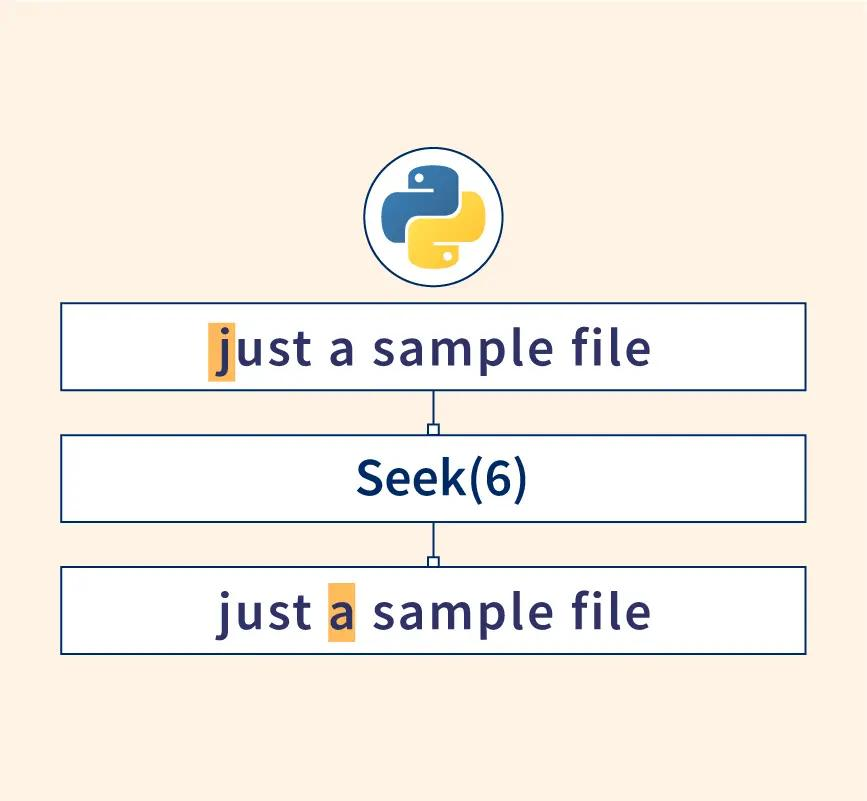
A file pointer is a position indicator that determines where the next reading or writing operation will take place.
Python provides two important methods:
tell()seek()
8.1 tell() Method
The tell() method returns the current position of the file pointer.
f = open("student.txt", "r")

print(f.tell())

data = f.read(5)

print(f.tell())

f.close()
8.2 seek() Method
The seek() method is used to move the file pointer to a specified position.
Syntax:
file_object.seek(offset, reference_point)| Reference Point | Meaning |
|---|---|
| 0 | Beginning of the file. |
| 1 | Current position. |
| 2 | End of the file. |
Example:
f = open("student.txt", "r")

print(f.read(5))

f.seek(0)

print(f.read())

f.close()
Here, seek(0) moves the file pointer back to the beginning.
Important: In text mode, supported seek operations are restricted. For ordinary text-file revision, remember seek(0) to return to the beginning.
Difference Between seek() and tell()
| seek() | tell() |
|---|---|
| Moves the file pointer. | Returns the current file pointer position. |
| Used for repositioning. | Used for finding position. |
| Takes an offset argument. | Does not require an argument. |
9. Binary File Handling in Python
Binary files store information in the form of bytes. They are useful for storing images, audio, video and Python objects.
Common binary file modes:
rb– Read Binarywb– Write Binaryab– Append Binary
Example:
f = open("image.dat", "wb")

f.write(b"Hello Python")

f.close()
The b before the string indicates a bytes literal.
10. Pickle Module in Python
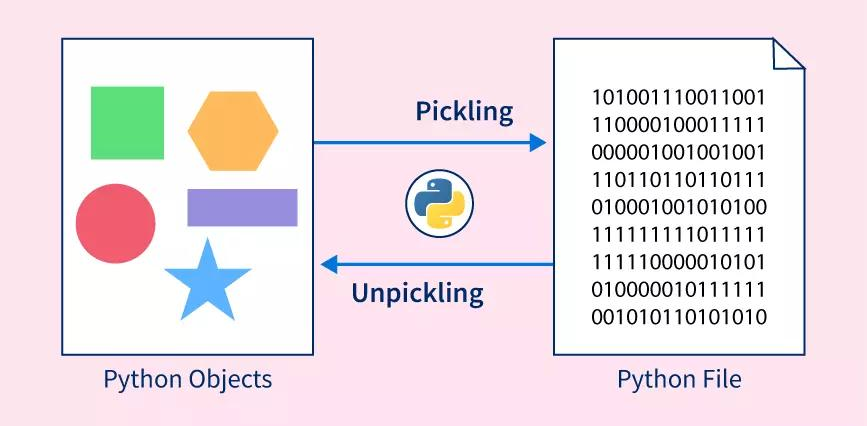
The Pickle module allows Python objects such as lists, dictionaries and tuples to be stored in binary files.
To use Pickle, we must import the module:
import pickleImportant Terms
Pickling: The process of converting a Python object into a byte stream so that it can be stored in a binary file. It is also called Serialization.
Unpickling: The process of converting the stored byte stream back into the original Python object. It is also called Deserialization.
Important Pickle Functions
| Function | Purpose |
|---|---|
| pickle.dump() | Writes an object into a binary file. |
| pickle.load() | Reads an object from a binary file. |
10.1 pickle.dump() Method
The dump() method stores a Python object in a binary file.
import pickle

student = {
    "Roll": 101,
    "Name": "Rahul",
    "Marks": 95
}

f = open("student.dat", "wb")

pickle.dump(student, f)

f.close()
10.2 pickle.load() Method
The load() method reads a Python object from a binary file.
import pickle

f = open("student.dat", "rb")

data = pickle.load(f)

print(data)

f.close()
Output:
{'Roll': 101, 'Name': 'Rahul', 'Marks': 95}10.3 EOFError in Binary Files
EOF stands for End Of File.
When Python tries to read beyond the available data in a file using pickle.load(), it raises an EOFError.
Example:
import pickle

try:
    f = open("student.dat", "rb")

    while True:
        data = pickle.load(f)
        print(data)

except EOFError:
    print("End of file reached")

finally:
    f.close()
This program reads records until no more objects are available.
Safety Note: Only load Pickle files from trusted sources because loading untrusted pickle files can execute malicious code.
11. Quick Revision – Important Functions
| Function | Purpose |
|---|---|
| open() | Opens a file. |
| close() | Closes a file. |
| read() | Reads file contents. |
| readline() | Reads one line. |
| readlines() | Reads all lines into a list. |
| write() | Writes a string. |
| writelines() | Writes a sequence of strings. |
| seek() | Moves the file pointer. |
| tell() | Returns the pointer position. |
| pickle.dump() | Saves a Python object. |
| pickle.load() | Retrieves a Python object. |
12. Important Practice Programs
Program 1: Write and Read a Text File
f = open("message.txt", "w")

f.write("Welcome to The Study Smart")

f.close()

f = open("message.txt", "r")

print(f.read())

f.close()
Program 2: Count the Number of Lines in a File
f = open("student.txt", "r")

lines = f.readlines()

print("Total Lines:", len(lines))

f.close()
Program 3: Count Words in a Text File
f = open("student.txt", "r")

data = f.read()

words = data.split()

print("Total Words:", len(words))

f.close()
Program 4: Count Vowels in a Text File
f = open("student.txt", "r")

data = f.read()

count = 0

for ch in data:
    if ch.lower() in "aeiou":
        count += 1

print("Total Vowels:", count)

f.close()
Program 5: Display Lines Starting with Letter A
f = open("student.txt", "r")

for line in f:
    if line.startswith("A") or line.startswith("a"):
        print(line, end="")

f.close()
13. Important Questions and Answers
Q1. What is File Handling in Python?
Ans. File Handling is the process of creating, opening, reading, writing and closing files using Python.
Q2. What is the purpose of the open() function?
Ans. The open() function opens a file in a specified mode and returns a file object.
Q3. What is the difference between write mode and append mode?
Ans. Write mode (w) overwrites existing contents, whereas append mode (a) adds new information at the end.
Q4. What is the difference between text and binary files?
Ans. Text files contain human-readable characters, whereas binary files contain data in byte form.
Q5. What is the purpose of close()?
Ans. The close() method closes an opened file and releases system resources.
Q6. What is the use of seek() and tell()?
Ans. seek() changes the position of the file pointer, whereas tell() returns its current position.
Q7. What is Pickling?
Ans. Pickling is the process of converting a Python object into a byte stream for storage in a binary file.
Q8. What is Unpickling?
Ans. Unpickling is the process of retrieving the original Python object from a stored byte stream.
Q9. Which module is used for Pickling?
Ans. The pickle module.
Q10. What is EOFError?
Ans. EOFError occurs when an attempt is made to read data beyond the end of a file using an operation such as pickle.load().
14. Important MCQs for Practice
- Which function is used to open a file in Python?A. read()
B. open()
C. write()
D. close()Answer: B. open() - Which mode overwrites existing file contents?A. r
B. a
C. w
D. rbAnswer: C. w - Which mode is used to append data?A. r
B. w
C. a
D. rbAnswer: C. a - Which method reads the entire file?A. read()
B. readline()
C. tell()
D. seek()Answer: A. read() - Which method reads one line at a time?A. read()
B. readline()
C. readlines()
D. write()Answer: B. readline() - Which method returns all lines as a list?A. read()
B. write()
C. readlines()
D. seek()Answer: C. readlines() - Which method returns the current file pointer position?A. seek()
B. tell()
C. close()
D. dump()Answer: B. tell() - Which method moves the file pointer?A. tell()
B. read()
C. seek()
D. load()Answer: C. seek() - Which module is used for Pickling?A. math
B. random
C. pickle
D. osAnswer: C. pickle - Which function stores an object in a binary file?A. pickle.load()
B. pickle.dump()
C. read()
D. tell()Answer: B. pickle.dump() - Which function retrieves a pickled object?A. pickle.dump()
B. pickle.load()
C. write()
D. seek()Answer: B. pickle.load() - Which mode is used to write binary data?A. w
B. a
C. wb
D. rAnswer: C. wb - What does EOF stand for?A. End of Function
B. End of File
C. Entry of File
D. End of FormatAnswer: B. End of File - Does writelines() automatically add newline characters?A. Yes, always
B. No
C. Only in binary mode
D. Only for listsAnswer: B. No - Which statement automatically closes a file?A. if statement
B. for statement
C. with statement
D. while statementAnswer: C. with statement
15. Tips to Score Good Marks in Board Examinations
- Learn all file access modes with their meanings.
- Practise the difference between
write()andwritelines(). - Understand
read(),readline()andreadlines(). - Practise output-based questions involving
seek()andtell(). - Understand Pickling and Unpickling with practical examples.
- Practise writing programs without looking at the textbook.
- Pay attention to indentation and Python syntax.
- Revise important definitions before examinations.
Conclusion
File Handling is an important concept in Python programming because it allows us to store and retrieve information permanently.
Students should understand file types, file modes, reading and writing methods, file pointers and Pickle functions.
Regular programming practice and revision will help you prepare confidently for your CBSE Class 12 Computer Science examination.
Keep learning, keep practising and keep moving towards success with The Study Smart!
Study Smart. Learn Better. Achieve More!